Quick Links
Just like nearly every other internal computer system,Lethal Company’s employees are forced to work with the very simple terminal technology of decades past. While simple, it’s invaluable in how it allows players to control their ship and get around the bunkers they find.
The terminal on your ship is easy to use once you know the commands and learn how different upgrades will benefit each trip. For more information about how to use it and what you can do with the terminal in Lethal Company, we’ve got it all covered right here.

Lethal Company is currently in Early Access on Steam, and all content is subject to change with further updates. If that happens, we will update this article as needed.
How To Use The Terminal
Outside of landing, the terminal is going to be where you’re returning to most during each trip to planets or The Company’s building. You’ll use the terminal for a wide range of functions, likenavigating, understanding the fauna, purchasing new gear for each trip, and a lot more. To activate it,simply type a prompt and press the ‘Enter’ key.
When you use the terminal for the first time, you’ll be asked to answer some prompt questions about yourself.Answer the prompt honestlyand press the Enter key.

After you’ve answered the initial prompt, you’ll be greeted with a menu that has different sections. This can feel like a lot at once, buta simple breakdown can help you understandwhat each section of the terminal is for.
you’re able to type ‘help’ into the terminal at any timeand hit enter, which will provide you with different prompt categories:
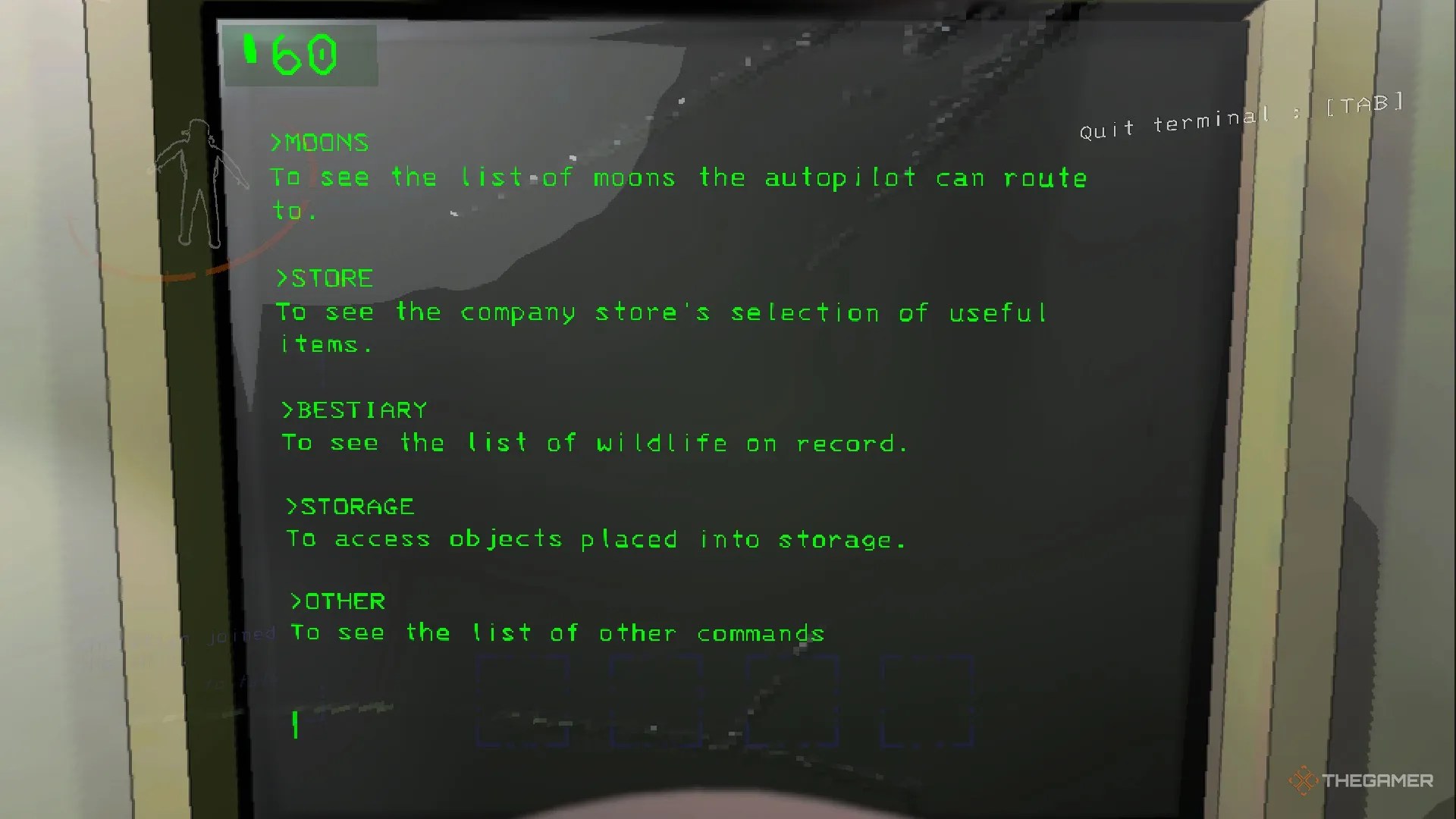
Moons
Opens the category withall the planets and The Company’s buildingfor routing the autopilot. It also shows the status of those planets' weather.
Store
Allows you topurchase items for your work and to decorate the ship, as long as you have enough credits.
Bestiary
Anymonsters you scan with the Right Mouse Button will appear here.
Storage
If you have any furniture you’re not using,you can store it or pull it out with this command.
Other
Miscellaneous commands likeView Monitor,Switchplayer monitoring,Pinga radar, and orScanfor all items left on the map.
Any of these commands can beactivated by typing the words into the terminal and pressing enter. Sometimes, this will cause an immediate reaction, but it may open a further screen for you to interact with. Most of the time,you’ll need to confirm an actionafter you’ve input it.

Some of thecommands can be shortened or entered from the main screen. For example, simply typing “Company” will give you the option to go directly to that planet. Typing “C” or “D” can act as ‘Confirm’ or ‘Deny.’
As you unlock ship upgrades and survive further in the game,you will unlock more options for the terminal through the store, like the ability to teleport or use a large horn. These require a basic mastery of the terminal but can be great assets when working as part of a team.
How To Open Locked Security Doors
When you or your friends are adventuring through a new bunker, you may come acrosslarge metal doors that connect in the middle. While initially seeming like a roadblock, they can easily be unlocked by someone still at the terminal. All you need to do isfind the code on the corresponding doorfrom the player monitor map screen.
This alsoworks briefly for turrets. Codes for the turrets and doors are usually justa letter followed by a number, shown by green or red boxes on the map to indicate status.
Once you’ve found the code for the door, simplyenter the two values into the computerand press enter. This will cause a small animation to appear in the bottom right half of the screen, showing a door opening with ‘Broadcasted Special Code’ text. It should be noted thatall activated commands give this prompt, even when you’re closing doors or disabling turrets for a few seconds.
All Terminal Commands
Havinga list of the terminal’s commands is invaluablein Lethal Company. While there are several commands you can currently use on the terminal to help in your work, there will likely be more added in the future.
Function
Opens the screen withall the available moons you can travel toand tellshow much the company is buying for.
Opens the menu withall purchasable tools, decorations, and ship upgrades.
Shows all the animals youscanned with the Right Mouse Buttonand allows you to view their details.
Shows anydecorations in your ship’s storageandallows you to pull them outby typing the name.
Turns the main monitor’smap cam on or off
Tells youhow many treasures are located on the planetyou’re on.
[Door or Turret Code]
Activates anddeactivates security doors and turretswith the code located on the map monitor.
Secret command that allowsaccess to hidden lore files.
Secret Commands
Like all good games, Lethal Company has secrets that you can find on the different planets, as well as your ship, that will give you access to files. You’ll access these files byentering the name “Sigurd” into the terminal and hitting enter.
You get one log at the start and must find the rest by chance on the moons while you’re doing your work.
After this,you’ll begin finding lore tapes around the worldthat give you more insight into previous employees and how they fared under the employ of The Company before you. From then on, you’llaccess all the gathered logs through the Sigurd command. After that, simplytype the log you want to access and hit enter.
